PixelVision8, often shortened to PV8, is an open-source fantasy console aimed at people who want to learn retro-style game development through a deliberately constrained toolset. What sets it apart is that the machine itself is part of the creative work: instead of starting from a fixed spec, you define the hardware limitations and then build within them. That makes PV8 useful both as a learning environment and as a way to think more carefully about what an 8-bit game machine can be.
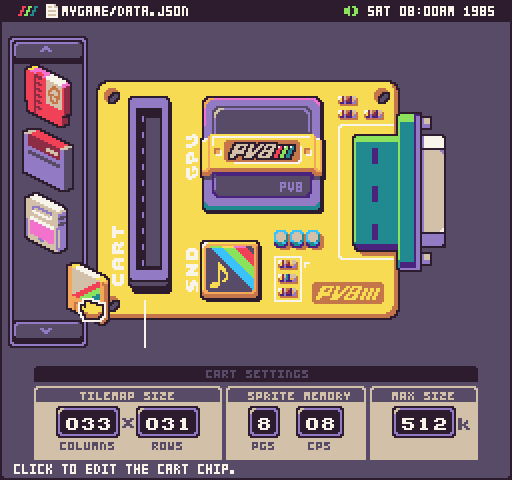
| Spec | Value |
|---|---|
| Display | User-defined within the console’s hardware model |
| Palette | User-defined within the console’s hardware model |
| Sprites on screen | User-defined within the console’s hardware model |
| Sound | User-defined within the console’s hardware model |
| Memory | User-defined within the console’s hardware model |
| Hardware model | Configurable “chips” such as CART / GPU / SND |
| Language | C# or Lua |
| Engine foundation | MonoVision, a fork of MonoGame |
| Platforms | Windows, macOS, Linux |
| Cartridge format | Project/workspace with built-in tools; see official docs for current workflow |
| Sharing | Official site, GitHub, itch.io, X/Twitter |
PixelVision8 is not trying to be a faithful emulation of one particular vintage console. Instead, it is a framework for making your own constrained console, with built-in tools and a workflow intended to be approachable for hobbyists. The official site and GitHub repository both describe that teaching focus clearly, and the wiki explains the hardware-definition model in more detail.
You define the hardware limits.
PV8’s defining idea is that the console does not ship with one unchangeable specification. You configure limits for resolution, colors, sprites, sound, and memory, then develop against those limits.
The hardware is organized into “chips.”
The official docs describe components such as CART, GPU, and SND. This gives PV8 a console-like structure while still letting you tailor the machine to the game you want to make.
It targets retro game learning, not just retro aesthetics.
The project’s stated philosophy is to teach retro game development with streamlined workflows, which matters because the constraints are educational, not merely stylistic.
It supports both C# and Lua.
That is useful for different kinds of users: Lua can suit quick iteration and smaller experiments, while C# may appeal to programmers who want a more conventional application language.
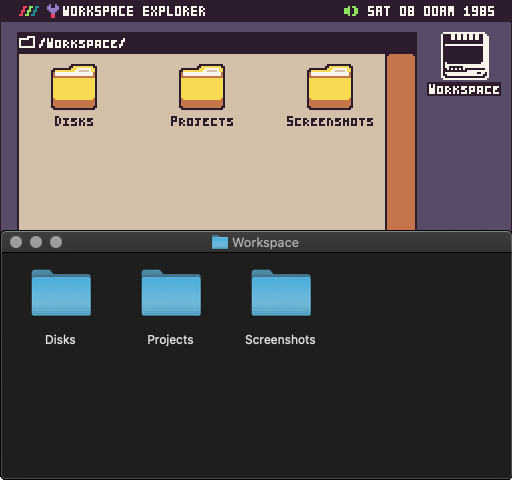
It ships as a full workspace with built-in tools.
Rather than requiring you to assemble an external editor chain, PV8 includes tools inside the environment. That lowers setup friction for newcomers.
For a quick sense of the project’s own framing, the official introduction video is worth watching:
A new user might reasonably ask whether a “console you configure yourself” is still a console at all. In PV8’s case, the answer is yes: the point is that the constraints are explicit, repeatable, and shared within a project. You are not working in a general-purpose desktop app and pretending it is a console; you are working in a system that asks you to define the machine up front.
The project page and wiki are the best primary sources for these basics. The GitHub repository explains the overall goals, while the wiki’s introduction page goes into the hardware-definition model and the role of the chips.
Among fantasy consoles, PixelVision8 sits in an unusual middle ground. TIC-80 gives you a fixed retro-style target with a small built-in toolbox and a published set of limits, which makes it straightforward to compare projects and follow tutorials. WASM-4 is even more minimal and intentionally stripped down, with a very small shared target designed around web deployment. LIKO-12 takes another approach again, using a Lua-based environment with a strong focus on its own integrated desktop-like experience. PV8 differs from all three by moving the “what is the machine?” question into your hands.
That difference changes how you learn. With TIC-80, WASM-4, or LIKO-12, the constraint comes first and the content follows. With PixelVision8, the constraint is itself editable: you can define the palette size, screen shape, memory budget, and other low-level boundaries before you start coding. In practice, that makes PV8 especially interesting for people who want to study retro design as a system rather than just as a look. It is closer to a classroom on console architecture than a fixed toy machine.
If you want a broader external overview, this community video can help situate PV8 among other fantasy-console tools, though the official repo and docs remain the primary references for specifics:
It is also worth noting that PV8 is implemented on MonoVision, a fork of the open-source MonoGame engine. That gives it a different technical base from browser-first systems like WASM-4 and helps explain why it runs on Windows, macOS, and Linux. For newcomers, the practical takeaway is simple: PV8 is not just a cartridge format or a single editor; it is a complete development environment with its own software foundation.
PixelVision8 matters because it treats limitation as something to design, not just something to accept. Most fantasy consoles ask you to work within a fixed rule set, which is already valuable. PV8 goes one step further by exposing the rule set itself as part of the creative process. That makes it a useful tool for teaching systems thinking: how screen size affects level design, how memory limits influence asset use, and how sound budgets shape composition.
This also gives PV8 a long-term educational value. For hobbyists and creative coders, it can be easier to understand “hardware” when the hardware is small, legible, and adjustable. A learner can build one project as if it were on a very tiny machine, then change the console definition and see how the design changes. That kind of feedback loop is rare in mainstream game engines, where the underlying machine is usually invisible.
PV8 also helps clarify what fantasy consoles can be beyond nostalgia. They are not only about copying old machines; they are about making constraints explicit enough that they become a creative language. In that sense, PixelVision8 extends the genre by showing that a fantasy console can be both a game-making tool and a hardware-design sandbox. For anyone interested in the history of game development, embedded constraints, or teaching through systems, that is a meaningful distinction.
The official community presence matters here too. The project’s GitHub repository and itch.io page are the most practical places to follow current tools and downloads, while the X account is the official social channel listed by the project.
If you are new to PV8, start with the official site and read the introduction and wiki pages before trying to build a full game. The most useful first goal is to make a tiny cartridge with one screen, one input loop, and one sound effect, then adjust the console definition to see how the machine changes your constraints. Because PV8 is designed around configurable hardware, understanding the hardware setup is part of learning the console.
The official introduction video from the project is a good companion piece while you read the docs:
The full source lives on GitHub. The repository card below links straight to it: